
Optical vs laser mouse: which works best for home offices
Ads
An optical mouse is the most dependable and cost-effective choice for a standard home office setup, delivering stable cursor movement across fabric mouse pads and common wooden desks. While laser models boast higher sensitivity ratings and track across glass, their heightened responsiveness often produces microscopic cursor jitter that makes clicking small spreadsheet cells and selecting text more frustrating than necessary.
Ads
This side-by-side assessment helps remote workers, administrative staff, and everyday computer users select an affordable pointing device that matches their daily routine, though buyers who insist on working on bare glass tables must account for optical tracking limitations. Understanding how each tracking sensor reads microscopic desk patterns ensures you spend your accessory budget on comfort and reliability rather than unusable technical specifications.
Ads
How optical and laser sensors track motion
Both optical and laser pointing devices rely on complementary metal-oxide semiconductor sensors, commonly known as CMOS sensors, to record movement. Inside the housing, a miniature digital camera captures thousands of frames per second of the surface directly underneath. An internal digital signal processor analyzes the sequential snapshots, identifies shifts in microscopic surface landmarks, and translates those shifts into precise cursor coordinates on your computer monitor.
The distinction between an optical vs laser mouse lies entirely in the illumination source used to illuminate those surface landmarks. An optical mouse employs an infrared or red light-emitting diode, abbreviated as LED, which casts a wide beam across the surface. Because LED light has a wider, incoherent wavelength, it illuminates only the upper layer of your desk or mouse mat. The CMOS sensor records clear, high-contrast shadows of surface peaks without penetrating beneath the primary material.
A laser mouse substitutes the standard LED with an invisible vertical-cavity surface-emitting laser diode. Coherent laser light produces an intense, focused beam that penetrates deeper into transparent or semi-translucent materials, such as polished stone, laminate coatings, and treated glass. By reflecting light from both the surface and the underlying substrate, the laser illuminates far more microscopic landmarks for the camera to inspect.
While gathering deeper surface detail sounds advantageous on paper, it often works against general productivity. The laser sensor captures so much microscopic variation that it registers the tiny fissures in fabric mats and wood grain as intentional movement. For everyday office applications like web browsing, document writing, and email management, the moderate illumination depth of an LED optical sensor yields far smoother, predictable pointer travel.
Surface compatibility and desk materials
The physical composition of your home workspace serves as the primary deciding factor when selecting an input device. Many home offices feature composite wood, genuine hardwood, laminated particle board, plastic laminates, or decorative glass. Each material reflects illumination differently, directly influencing tracking stability.
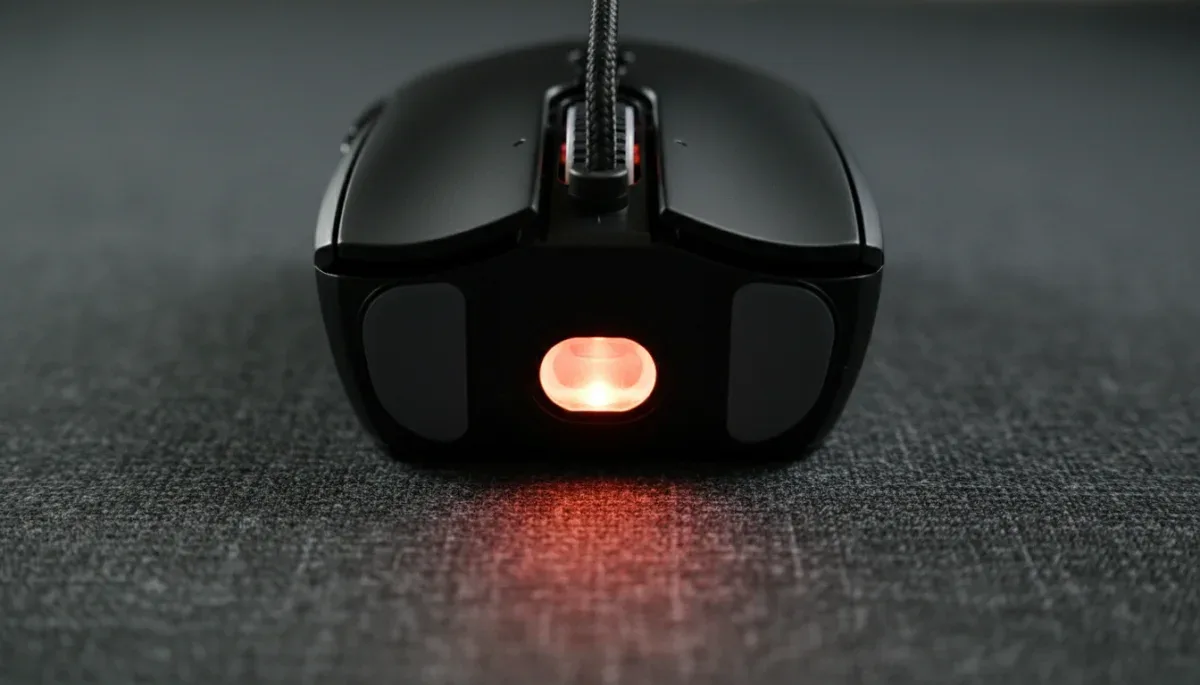
Standard optical mice perform best on opaque, non-reflective surfaces. An inexpensive fabric mouse pad remains the ideal companion for an optical sensor because the woven thread provides consistent contrast in every direction. If you prefer a bare desk without extra accessories, an optical mouse functions reliably on matte laminate and natural wood, provided the finish is not overly reflective or high-gloss.
Clear glass desks represent the single major challenge for traditional optical tracking. Because LED light passes straight through clear glass without creating high-contrast surface shadows, the sensor camera cannot detect directional movement, causing the cursor to freeze or wander erratically. In contrast, a laser mouse illuminates microscopic imperfections, dust specks, and internal glass structures, allowing seamless tracking across clear, polished tables.
Evaluating your desk surface
- Fabric mouse pads: Optical sensors provide exceptionally consistent tracking without detecting unwanted thread weave fluctuations.
- Unfinished or matte wood: Both optical and laser units track reliably, though optical models minimize unintentional cursor drift.
- Clear glass tops: Laser models function without assistance, whereas standard optical sensors require a dedicated pad to read movement.
- High-gloss lacquer: Optical light scatters unpredictably on shiny finishes, making laser sensors the more capable bare-surface option.
If you prefer an uncluttered desk aesthetic without mouse pads and work directly on glass or polished stone, a laser unit provides practical functionality. However, adding an inexpensive desk pad instantly neutralizes this advantage, allowing a standard optical mouse to deliver equal or superior tracking precision.
Tracking accuracy, DPI, and pointer precision
Pointing device performance is frequently evaluated using dots per inch, abbreviated as DPI, which refers to the number of individual steps the sensor reports for every physical inch of movement across the desk. Manufacturers often use high DPI figures as a marketing tool, suggesting that larger numbers automatically represent superior engineering and improved workflow efficiency.
Laser mice frequently feature adjustable sensitivity settings ranging from 4,000 DPI up to 20,000 DPI, whereas standard office optical mice usually operate between 800 DPI and 2,400 DPI. In everyday practice, ultra-high sensitivity is impractical for regular office duties. At 8,000 DPI, moving your hand by a single millimeter sends the cursor flying across multiple monitors, making it exceedingly difficult to target an individual spreadsheet cell or click a toolbar button.
For standard 1080p and 1440p office displays, a setting between 1,000 DPI and 1,600 DPI offers the most balanced relationship between hand movement and cursor travel. Standard optical mice operate comfortably inside this sweet spot without software interpolation. Because the optical sensor does not over-analyze surface depth, it eliminates jitter—the undesirable trembling of the cursor caused by the sensor misinterpreting microscopic hand tremors or surface indentations as navigation input.
Another technical factor is hardware acceleration, where the cursor travels farther if moved quickly over the same physical distance. Laser sensors historically suffered from built-in hardware acceleration, meaning pointer travel varied depending on hand speed rather than physical distance alone. Optical sensors provide a linear, 1:1 relationship between hand motion and pointer location, which builds muscle memory and reduces hand strain over an eight-hour shift.
Energy consumption and battery longevity
For wireless home office setups, power efficiency directly dictates how frequently you must replace alkaline cells or connect a charging cable. Wireless hardware consumes power primarily through the illumination source, the digital signal processor, and the wireless radio transmitter communicating via 2.4 gigahertz USB dongle or Bluetooth.
Standard optical mice utilize highly efficient modern LEDs that draw minimal electrical current. Many wireless optical office units operate for twelve to twenty-four months on a single AA alkaline battery, depending on brand engineering and usage habits. The lower processing demands of optical tracking allow the internal electronics to enter low-power sleep modes promptly when idle and wake instantly upon physical movement.
Laser diodes and their high-frequency digital signal processors demand noticeably more energy to illuminate surfaces and calculate intricate depth data. While modern engineering has narrowed the energy gap, a wireless laser mouse generally depletes battery reserves faster than a comparable optical counterpart under identical workload conditions. Rechargeable laser units may require weekly or monthly top-ups via USB-C, whereas battery-operated optical alternatives run for multiple quarters without intervention.
When shopping for budget-friendly home office gear, long battery life minimizes ongoing replacement costs and prevents unexpected interruptions during meetings. An energy-efficient optical mouse ensures your primary input peripheral remains active without persistent monitoring of battery indicator LEDs.
Durability, maintenance, and everyday ergonomics
A dependable computer mouse must withstand daily operational demands, occasional drops, and airborne household debris without losing sensor accuracy. Long-term reliability involves both the internal tracking components and the physical shell housing the mechanical switches.
Optical mice feature relatively wide sensor apertures on their bottom plates. Because the LED does not require microscopic focusing tolerances, minor dust buildup around the opening rarely impairs navigation. If an optical mouse begins skipping, blowing into the sensor recess or gently wiping the lens with a dry cotton swab immediately restores tracking performance. The simple internal construction also reduces heat generation, preserving the lifespan of internal circuits.
Laser mice utilize narrower lenses designed to focus coherent light tightly. Microscopic dust particles, pet hair, or dried liquid specks adhering to the laser lens can scatter the beam, causing immediate tracking stutter or total sensor blindness. Maintaining a laser unit requires keeping your desk surface thoroughly clean and periodically inspecting the sensor cavity with compressed air.
Essential maintenance routines
- Clean the sensor cavity: Clear loose dust from the optical or laser lens monthly using a quick burst of clean compressed air.
- Wipe mouse feet: Remove adhesive residue and compressed dust from the slick bottom glide pads to maintain smooth movement across the desk.
- Sanitize contact shells: Wipe the exterior plastic housing and rubberized side grips with a damp microfiber cloth to remove skin oils.
- Inspect scroll wheels: Clear hair and fiber accumulation from the scroll wheel gap to prevent mechanical scrolling resistance.
Ergonomics depend primarily on shell shape rather than internal sensor type. Whether you select an optical vs laser mouse, prioritize a contoured body that supports your natural palm arch and allows your fingers to rest naturally on the primary left and right click switches without cramping.
Budget considerations and retail return policies
Affordability remains a central concern when outfitting a comfortable remote workstation. Pointing devices span a vast price spectrum, from simple budget peripherals to expensive luxury productivity tools. Aligning your purchase with published specifications prevents overpaying for specialized features that offer no tangible office benefit.
General optical mice represent the most accessible tier of computer peripherals. Dependable, wired optical units from established hardware companies frequently retail at accessible prices, while wireless optical variants offer exceptional utility without requiring substantial financial investment. Because optical technology is mature and inexpensive to produce, manufacturers deliver reliable tracking sensors even in budget-friendly hardware lines.
Laser-equipped mice generally occupy higher price brackets due to the specialized diode assemblies and higher-throughput processing chips required to interpret laser tracking data. Unless you strictly require bare glass tracking, paying the premium for laser hardware yields diminishing returns for standard word processing, accounting spreadsheets, and communication apps.
When purchasing electronics online through affordable retail platforms, always review the merchant return policy before completing your order. At the time of writing, major platforms typically offer thirty-day return windows for unopened or malfunctioning hardware, though return shipping fees or restocking terms may vary depending on third-party seller status. Retain original packaging and receipts during the initial weeks of use so you can return or exchange the unit if the sensor performs poorly on your specific desk finish.
At a glance
| Factor | What to know |
|---|---|
| Surface versatility | Optical requires an opaque pad or matte desk, while laser tracks smoothly on clear glass. |
| Cursor smoothness | Optical provides steady, predictable tracking without picking up unwanted micro-texture jitter. |
| Battery consumption | Optical sensors draw less current, extending wireless battery lifespan across months of daily use. |
| Pricing and value | Optical delivers better value for money, keeping home office hardware costs low and practical. |
Frequently asked questions
Can an optical mouse work on a glass desk?
No, standard optical mice cannot track on clear glass because LED light passes straight through transparent surfaces without casting readable shadows. To use an optical mouse on glass, you must place an opaque mouse mat, desk pad, or sheet of paper underneath the sensor to provide sufficient visual contrast for movement detection.
Is higher DPI always better for everyday office tasks?
No, high DPI settings make cursor movement excessively sensitive, causing small hand motions to send the pointer across the screen. For standard spreadsheets, document editing, and web navigation on common monitor resolutions, a moderate sensitivity range between 1,000 DPI and 1,600 DPI provides the greatest comfort, stability, and clicking precision.
Why does a laser mouse jitter on some mouse pads?
A laser mouse jitters because its coherent beam penetrates deep into the material, detecting microscopic variations in fabric weaves or textured plastics. When the sensor registers these tiny crevices at low hand speeds, it interprets them as movement commands, causing the on-screen cursor to twitch slightly while you attempt to click small targets.
Do optical mice last longer than laser mice?
Yes, optical mice often enjoy greater longevity in typical home environments because their wider sensor lenses tolerate dust accumulation better than laser apertures. The lower heat output of LED sensors and simpler internal processing architectures also reduce component stress, leading to fewer sensor-related hardware failures over several years of regular office operation.
The bottom line
For the vast majority of everyday home office setups, an optical mouse paired with a simple fabric pad is the most sensible, accurate, and budget-conscious choice. It eliminates frustrating cursor jitter, offers extended wireless battery life, and handles everyday business software effortlessly. Before ordering a new pointing device, inspect your desk material and check the retailer return policy to verify you can return the peripheral if its tracking sensitivity does not suit your workspace.
Written by
Maria Eduarda
Maria Eduarda writes about discounts, house and electronics for onlyshein.com. Each article explains how things work, compares published details such as prices, policies and program rules, and points readers to the official source before they decide.