
Mechanical vs membrane keyboards for home office typing
Ads
Mechanical keyboards provide superior tactile feedback and longevity for home office typing, whereas membrane keyboards offer quieter keystrokes at a significantly lower initial cost. The physical mechanism under each key determines how your hands feel after eight hours of work, how loud your workspace becomes, and how long the hardware lasts before keys begin to fail.
Ads
This comparison helps remote workers and desk professionals choose the right input tool for daily productivity, though mechanical models demand a higher upfront budget and careful switch selection to avoid disrupting family members or virtual calls. Understanding the fundamental differences in switch construction, actuation, and ergonomics ensures you spend your equipment budget on practical comfort rather than unnecessary features.
Ads
How internal switch mechanisms differ
The core distinction between these two technologies lies in the mechanism that registers each keystroke. A membrane keyboard uses three flexible layers: an upper conductive trace layer, a non-conductive separator with holes, and a bottom conductive layer. Above these layers sits a sheet of rubber or silicone domes. When you press a key, the rubber dome collapses, pushing the top conductive layer through a hole in the separator to contact the bottom layer, which completes the electrical circuit. This design requires you to press the key almost all the way down to register input, producing a soft, cushioned sensation.
In contrast, a mechanical keyboard uses an individual, self-contained physical switch beneath every single keycap. Inside each switch housing, a plastic stem moves downward against a metal coil spring, pushing metal contact leaves together to register the keystroke. Because the electrical connection happens mid-press rather than at the bottom of the stroke, you do not need to push the key entirely down to register a character. This independent construction allows for distinct engineering variations.
Common mechanical switch categories
- Linear switches: Provide a smooth, uninterrupted stroke from top to bottom without any tactile bump or audible click before bottoming out.
- Tactile switches: Feature a gentle physical bump near the actuation point, signaling that the keypress registered without requiring a bottom-out strike.
- Clicky switches: Combine the tactile bump with a sharp, metallic click sound designed for deliberate auditory confirmation on every keystroke.
Typing fatigue and physical strain over long workdays
Typing fatigue occurs when finger joints and tendons repeatedly absorb deceleration shock during extended writing sessions. Because membrane keyboards require the rubber dome to collapse fully against the underlying plastic backing plate, typists naturally "bottom out" on every keystroke. Over thousands of words, this repeated hard landing against a solid surface transfers kinetic energy back into the fingertips and wrists. The rubber material also requires peak force at the very start of the press, which can make fingers feel sluggish after hours of drafting reports or answering emails.
Mechanical keyboards reduce this physical impact through variable spring resistance and higher actuation points. Most standard mechanical switches actuate at roughly 2.0 millimeters of travel, despite having a total travel distance of 4.0 millimeters. Once you learn the actuation point, you can type with a lighter touch, floating your fingers across the keys without striking the backplate. Furthermore, mechanical keyboards come in varied spring weights, ranging from ultra-light thirty-five-gram springs to heavy eighty-gram options, letting users select a resistance profile tailored to their hand strength.
Sound profiles and shared workspace etiquette
Acoustic management is a primary consideration for home offices, especially in open floor plans or environments with frequent video conferences. Membrane keyboards are inherently quiet because the soft rubber dome absorbs the impact of the keypress, and there are no moving metal leaves to click together. This makes membrane hardware an unobtrusive choice for typing notes during live microphone sessions or working late at night near sleeping family members.
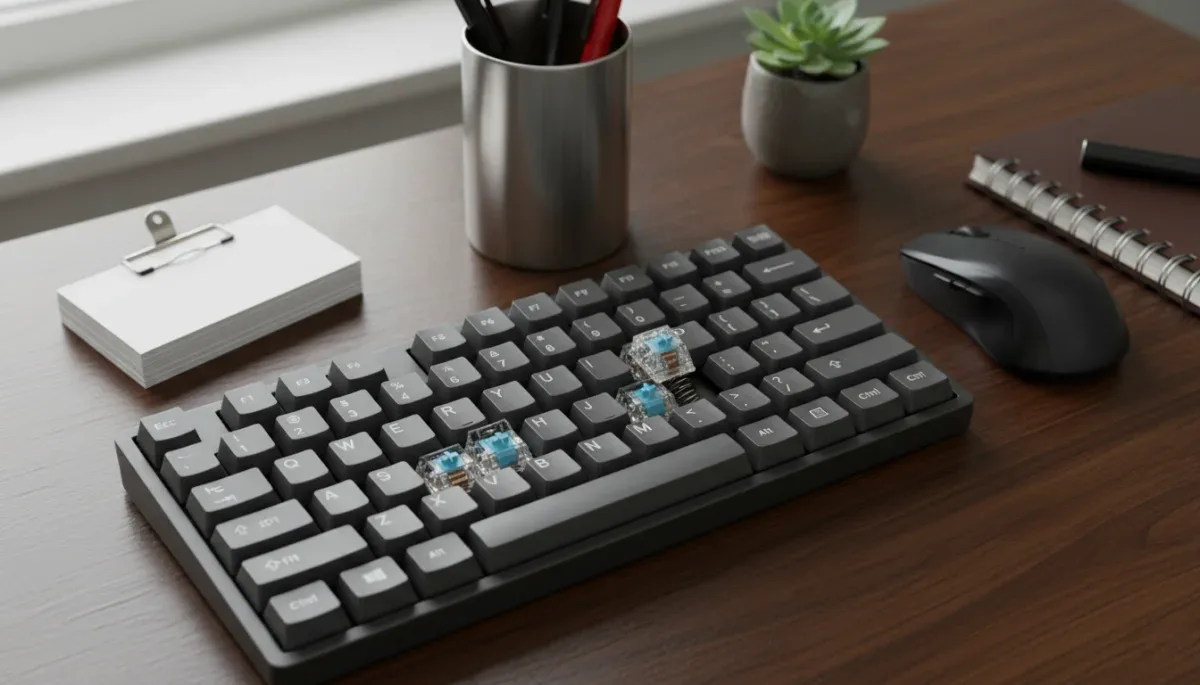
Mechanical keyboards exhibit a wider, louder sound spectrum. While clicky switches produce intentional noise that microphones easily capture, even non-clicky tactile or linear switches generate sound when the plastic stem hits the housing. Desk resonance, hollow keyboard frames, and plastic keycaps all amplify these keystrokes. Home typists who prefer mechanical feel without the volume often use silent mechanical switches, which incorporate silicone dampening pads directly onto the stem rails, or install small rubber O-rings beneath each keycap to soften the downstroke.
Build quality, cleaning, and long-term durability
Durability metrics reveal a wide divide between the two styles. Manufacturers of mechanical switches, such as Cherry and Gateron, publicly rate their components for fifty million to one hundred million keystrokes per switch. Because each switch is an isolated component, a single failing switch does not ruin the entire board. In modern "hot-swappable" mechanical keyboards, users can pull out a broken switch and snap in a replacement without any soldering tools.
Membrane keyboards generally carry ratings between five million and ten million keystrokes. Over time, environmental heat, friction, and repeated stress cause the internal rubber domes to degrade, lose elasticity, or harden, resulting in an inconsistent typing resistance across different regions of the layout. Cleaning a membrane board is also difficult; removing individual keycaps can break delicate plastic clips, and dust or spills inside the membrane layers can permanently ruin the conductive traces. In mechanical boards, standard keycap pullers remove keycaps safely, allowing easy access to clean dust, pet hair, and debris from the mounting plate.
Customization options and retail price points
Budget constraints heavily influence the selection process. Standard membrane keyboards produced by major peripheral manufacturers cost between fifteen and forty dollars at retail. These units are mass-produced, lightweight, and functionally complete right out of the box, offering a plug-and-play solution that requires no technical research. However, membrane keyboards offer virtually no customization; you cannot change the switch feel, alter the key travel, or easily replace standard keycaps with custom ergonomic profiles.
Entry-level mechanical keyboards begin around forty to sixty dollars, while enthusiast and professional models range from one hundred to three hundred dollars. This higher price brings durable aluminum frames, detachable USB-C cables, programmable firmware for remapping keys, and interchangeable keycap sets made from thick PBT plastic that resists skin oils. While the initial investment is considerably higher, the ability to repair, clean, and modify individual parts often extends the functional life of a mechanical unit well past that of several cheap membrane boards combined.
At a glance
| Evaluation factor | What to know |
|---|---|
| Initial purchase cost | Membrane models are budget-friendly, while mechanical keyboards require a higher investment. |
| Acoustic volume | Membrane keys are naturally quiet, whereas mechanical switches range from moderate to loud. |
| Keystroke lifespan | Mechanical switches outlast membrane rubber domes by tens of millions of presses. |
| Repairability | Mechanical boards allow simple individual part replacement, unlike sealed membrane sheets. |
Frequently asked questions
Are mechanical keyboards always loud?
Mechanical keyboards are not always loud. While clicky models produce a sharp snapping sound, linear and silent mechanical switches utilize dampening materials that operate at decibel levels comparable to standard office membrane keyboards, making them suitable for video conferences.
Can a membrane keyboard cause finger fatigue?
A membrane keyboard can contribute to finger fatigue over long typing sessions. Because you must bottom out every key against a solid plastic plate to complete the circuit, your fingertips absorb repeated shock impacts throughout the workday.
Do mechanical keyboards work with standard office computers?
Mechanical keyboards work with any standard computer running Windows, macOS, or ChromeOS via basic USB connection. Most operate immediately without specialized software, although advanced configuration tools may require administrative installation rights on managed corporate devices.
How difficult is it to clean a mechanical keyboard?
Cleaning a mechanical keyboard is straightforward because the keycaps detach using an inexpensive plastic or wire puller. Once the caps are removed, you can brush away debris from the plate or wipe the surfaces without damaging the underlying electrical components.
The bottom line
Selecting between mechanical and membrane keyboards depends on your daily typing volume, your acoustic tolerance, and your willingness to invest upfront in repairable hardware. Membrane models remain an accessible, quiet choice for casual home office tasks, while mechanical keyboards deliver customizable ergonomics, reduced finger impact, and extended durability for heavy daily typing. Before purchasing, verify the retailer return window on your chosen switch type so you can evaluate the physical resistance and noise profile directly in your workspace.
Written by
Maria Eduarda
Maria Eduarda writes about discounts, house and electronics for onlyshein.com. Each article explains how things work, compares published details such as prices, policies and program rules, and points readers to the official source before they decide.